The Market Pulse Hub screener lets you search all 260 scored PSX stocks in a few clicks. You can start from one of eleven ready-made lists or build your own filter from scratch. This guide walks through every part of it with screenshots: what each filter means, how to read the results, how to sort them, what to do when nothing matches, and how to save a screen or share it with someone else.
If you only have two minutes, read Quick start and Five screens to try.
Quick start
- Open the dashboard, choose PSX / KSE-100, then Stocks, then Screener.
- Click a ready-made list such as Quality at a fair price, or type numbers into the filter boxes.
- Click a column heading in the results to sort by it.
- Click any stock to open its full page.
- Click Save filter to keep the screen on this device, or Copy share link to send it to someone.
1. Opening the screener
The screener sits inside the PSX part of the dashboard. Switch the top toggle to PSX / KSE-100, choose the Stocks tab, then pick Screener from the row of buttons below it. The other buttons in that row are useful companions: Sectors shows averages for each sector, and Compare puts two stocks side by side.

2. How the screen is laid out
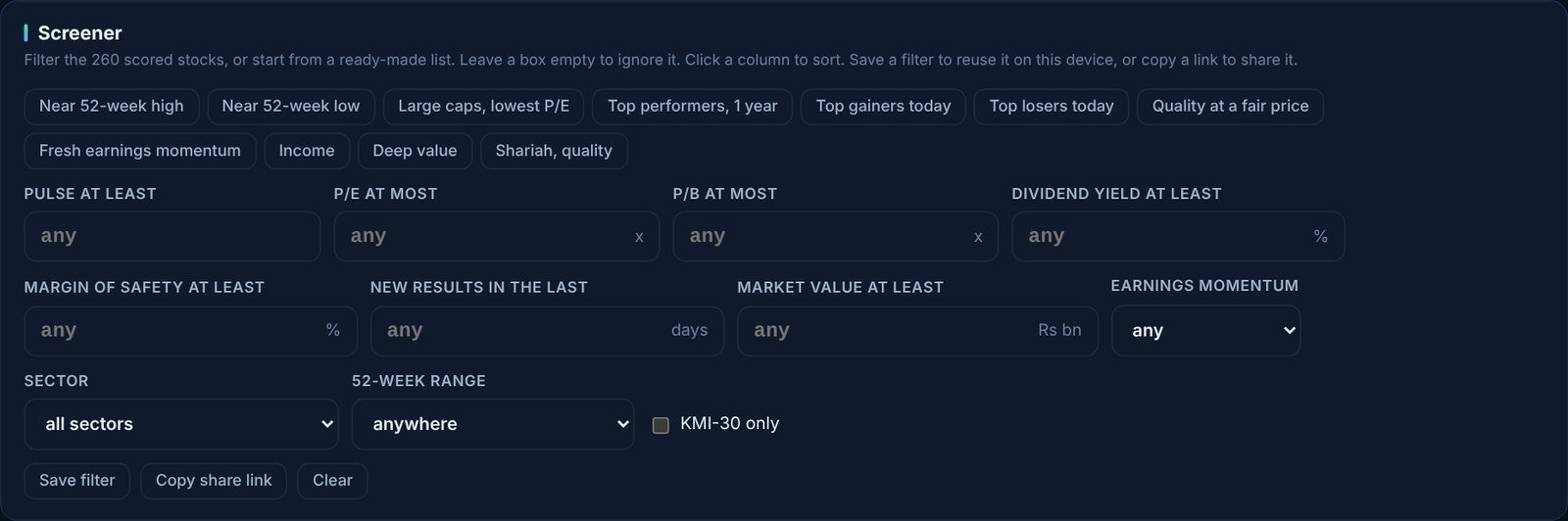
The screener has two parts. The top card holds the controls:
- a row of ready-made lists,
- the filter boxes,
- three drop-downs (earnings momentum, sector and 52-week range) and a KMI-30 tick box,
- the Save filter, Copy share link and Clear buttons.
Below it is the results table. The heading tells you how many stocks pass every filter. With no filters set, every scored stock is listed, highest Pulse Score first.
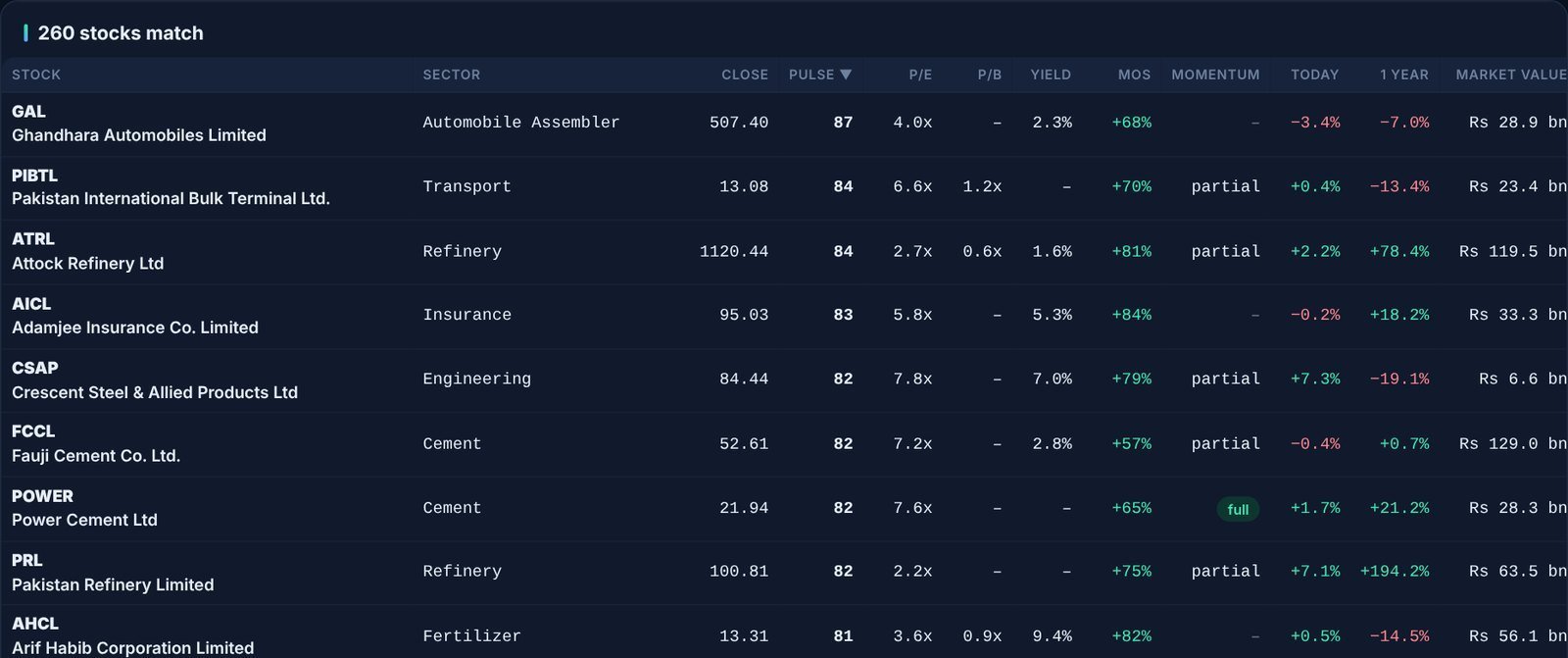
Two rules make the screener easy to use:
- An empty box is ignored. Every box shows “any” until you type a number, so you only need to fill the filters you care about.
- Filters combine. A stock has to pass every filter you set, not just one of them. Each extra filter narrows the list.
3. Ready-made lists
The quickest way in is to click one of the eleven buttons at the top. Each one fills in the filters and the sort order for you. The active list is highlighted, and you can see exactly what it set in the boxes below. Here is Quality at a fair price, which looks for a Pulse Score of at least 70 and a P/E of 8 or less:
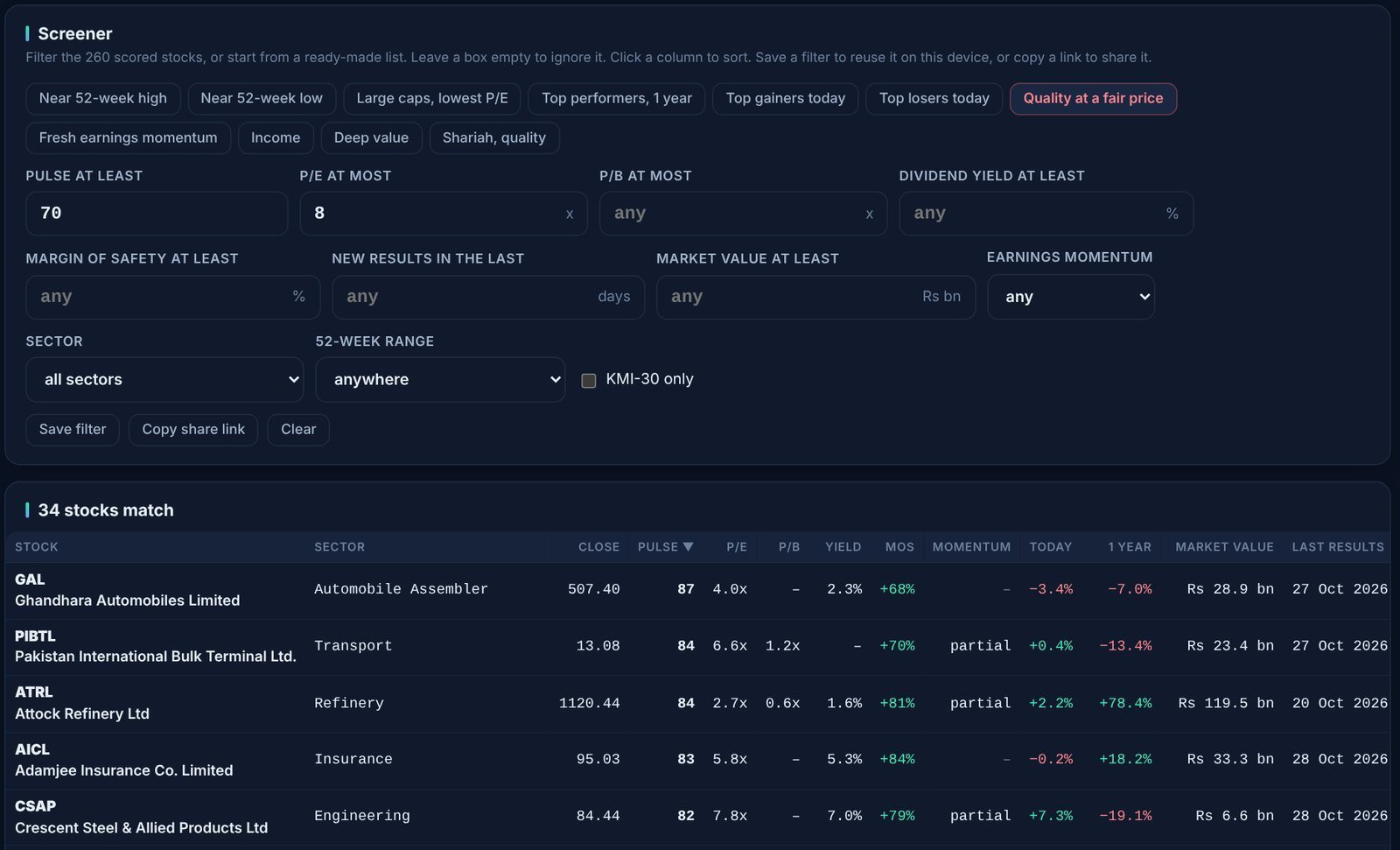
You can change any value after clicking a list. For example, start from Quality at a fair price and raise the P/E limit to 10 to see a few more names.
| List | What it does | Good for |
|---|---|---|
| Near 52-week high | Shares in the top 10% of their 52-week price range, market value of at least Rs 5 bn, sorted by 1-year return | Finding strong price trends |
| Near 52-week low | Shares in the bottom 10% of their 52-week range, Rs 5 bn or more, weakest 1-year return first | Starting a search for beaten-down names (check why they fell) |
| Large caps, lowest P/E | Market value of at least Rs 100 bn, cheapest P/E first | Value among the biggest companies |
| Top performers, 1 year | Rs 5 bn or more, best 1-year share price change first | Seeing what has led the market |
| Top gainers today / Top losers today | Rs 5 bn or more, sorted by today’s price change | A quick view of the day’s movers |
| Quality at a fair price | Pulse at least 70 and P/E at most 8 | Good businesses that are not expensive |
| Fresh earnings momentum | A full earnings momentum signal and new results in the last 14 days | Results season: companies whose profit is accelerating |
| Income | Dividend yield of at least 8% and Pulse at least 50 | Dividend investors who still want reasonable quality |
| Deep value | Margin of safety of at least 30% and P/E at most 6 | Shares trading well below our fair value estimate |
| Shariah, quality | KMI-30 members only, Pulse at least 65 | Shariah-compliant investors |
4. Every filter explained
| Filter | What it means | Typical values |
|---|---|---|
| Pulse at least | Our overall score out of 95, built from five pillars: growth, stability, valuation, efficiency and cash flow. 70 or more is good, 50 to 70 average, under 50 weak. | 60 to 75 |
| P/E at most | Share price divided by earnings per share over the last 12 months. Lower means you pay less for each rupee of profit. Loss-making companies (no positive P/E) are left out when this filter is set. | 6 to 12 |
| P/B at most | Share price divided by book value per share. Below 1 means the shares trade under the value of the company’s net assets. Useful for banks and asset-heavy companies. | 1 to 2 |
| Dividend yield at least | Cash dividends paid over the last 12 months as a percentage of today’s price. | 6% to 10% |
| Margin of safety at least | How far the price is below our fair value estimate: (fair value minus price) divided by fair value. A positive number means the share trades below the estimate. Negative values are allowed, so -20 means “no more than 20% above fair value”. | 20% to 40% |
| New results in the last | Only companies that announced results within this many days. Handy in results season. | 7 to 30 days |
| Market value at least | Company size in billions of rupees. It is a good way to skip very small, thinly traded shares. | 5 to 100 Rs bn |
| Earnings momentum | Our check for accelerating profit. A signal needs operating profit growing at least 20% and profit after tax growing at least 1.5 times as fast. It is tested twice: over the last 12 months and for the latest quarter against a year earlier. Full means both tests pass; partial means one does. | “partial or full”, or “full only” |
| Sector | Limits the list to one PSX sector. | Any |
| 52-week range | “Near the high” keeps shares in the top 10% of their 52-week range; “near the low” keeps the bottom 10%. | Either |
| KMI-30 only | Only members of the KMI-30 Shariah index. | Tick or leave blank |
5. Building your own screen, step by step
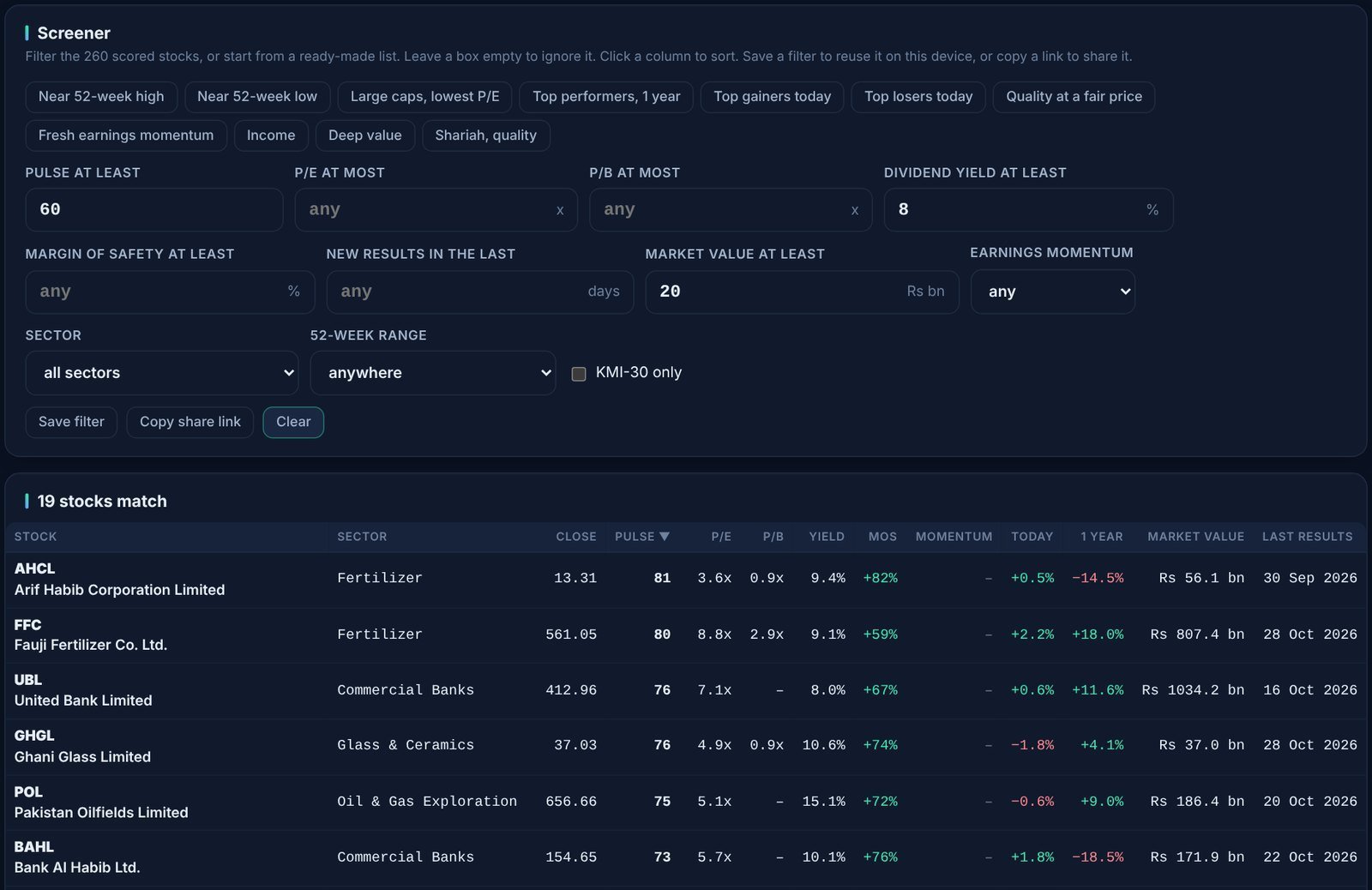
Suppose you want established, decent-quality companies that pay a high dividend. Click Clear first, then:
- Type 60 in Pulse at least.
- Type 8 in Dividend yield at least.
- Type 20 in Market value at least to skip companies under Rs 20 bn.
The list updates as soon as you leave each box. On the day of these screenshots, 19 stocks passed all three filters, from fertilizer and oil and gas to banks and glass.
6. Narrowing by sector and sorting
Next, choose Commercial Banks in the Sector drop-down and click the Yield column heading. The list drops to eight banks, highest yield first. A small arrow shows which column is sorted. Click the same heading again to flip the order, and the note under the filters spells out the current sort (“Sorted by yield, highest first”).
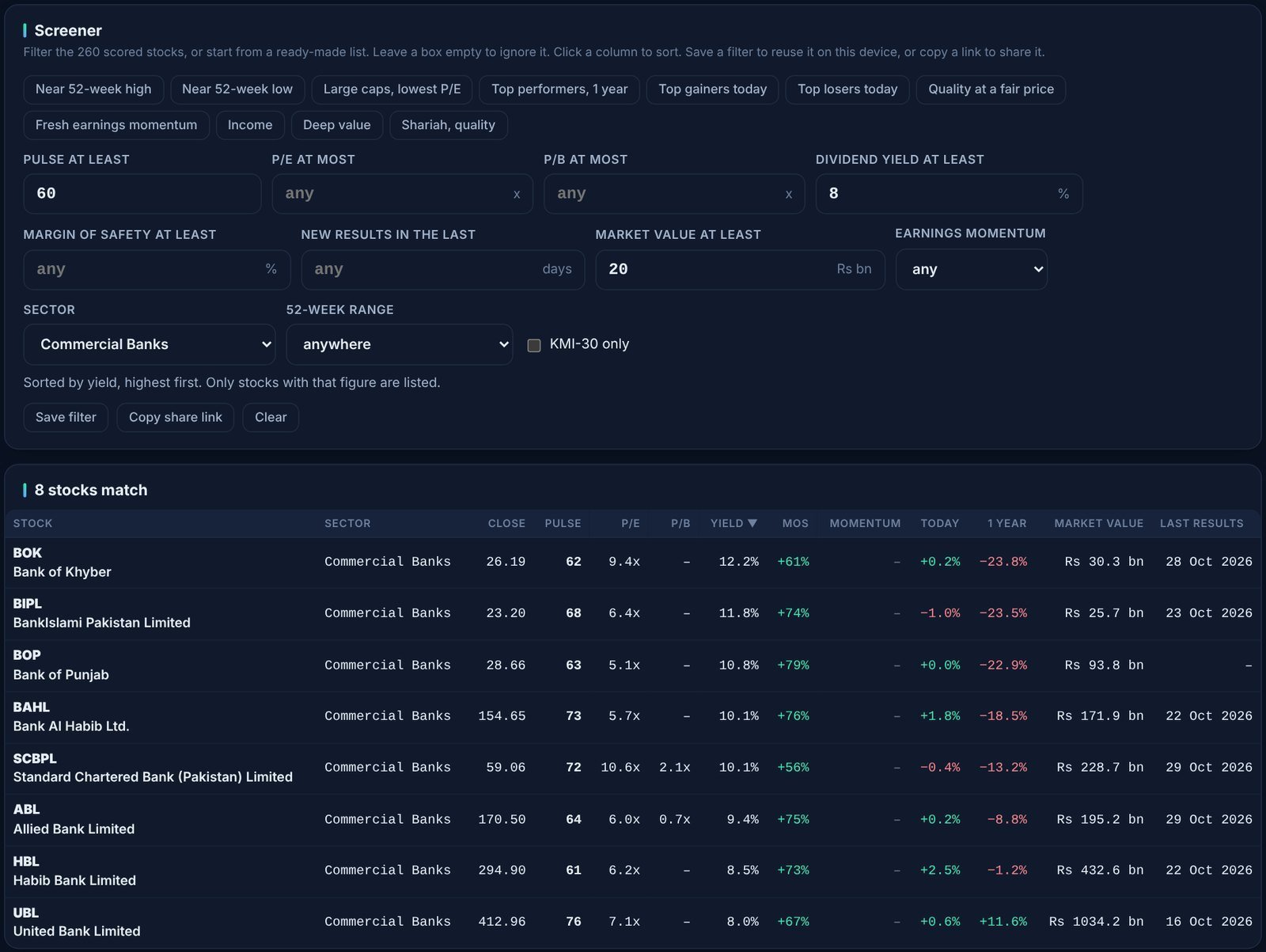
A few points about sorting:
- You can sort by any of these columns: stock, close, Pulse, P/E, P/B, yield, margin of safety, momentum, today’s change, 1-year change and market value.
- When you sort by a figure, stocks without that figure are hidden, so a P/E sort leaves out loss-makers. The note under the filters reminds you of this.
- The table shows up to 300 rows, which is more than the whole scored list.
7. Reading the results table
| Column | What it shows |
|---|---|
| Stock | Symbol and company name. Click the row to open the stock’s page. |
| Sector | The PSX sector. |
| Close | The latest closing price in rupees. |
| Pulse | Pulse Score out of 95. |
| P/E and P/B | Valuation ratios, as described above. A dash means the figure is not available or not meaningful. |
| Yield | Dividend yield over the last 12 months. |
| MoS | Margin of safety against our fair value estimate. Green is below fair value, red above. |
| Momentum | “full” (highlighted), “partial” or a dash for no signal. |
| Today and 1 year | Share price change today and over the last 12 months. |
| Market value | Company size in billions of rupees. |
| Last results | The date of the company’s most recent results announcement. |
8. When nothing matches
Strict screens sometimes return nothing. Rather than leaving you guessing, the screener tells you which filter is holding things back and how many stocks would match without it. In this example, Pulse of at least 80, P/E of at most 5 and a yield of at least 10% found nothing. Dropping either the Pulse or the yield filter would bring back four stocks.

Loosen the filter it names, or relax the number a little (for example a yield of 9% instead of 10%), and try again.
9. Saving and sharing a screen
Once you have a screen you like, you do not need to rebuild it each time.
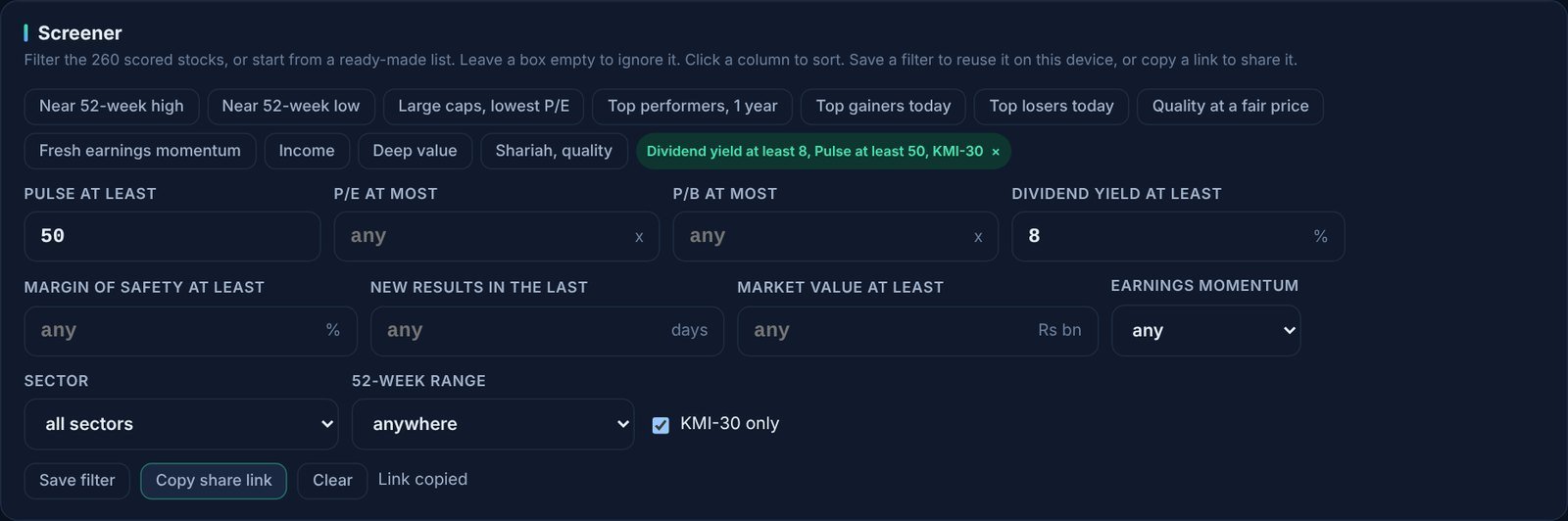
- Save filter adds it as a green button at the end of the ready-made lists, named after its settings. Click the name to load it again, or the small × to delete it. Saved screens are kept in your browser on this device. Up to 12 are kept, and the oldest is dropped when you add more.
- Copy share link copies a web address with your filters built in, and shows “Link copied”. Anyone who opens the link sees the same screen with today’s data. It is also the way to move a screen to your phone or another computer.
- Clear resets every filter and the sort order.
Below, the Income list was loaded, KMI-30 only was ticked, and the result was saved and copied as a link:
10. From a list to a decision
A screen is a shortlist, not a buy list. Click any row to open the stock’s page. There you will find:
- the Pulse Score broken into its five pillars,
- the fair value range from four valuation methods,
- where the price sits in its 52-week range,
- strengths and watch-outs, dividend history and the latest results.
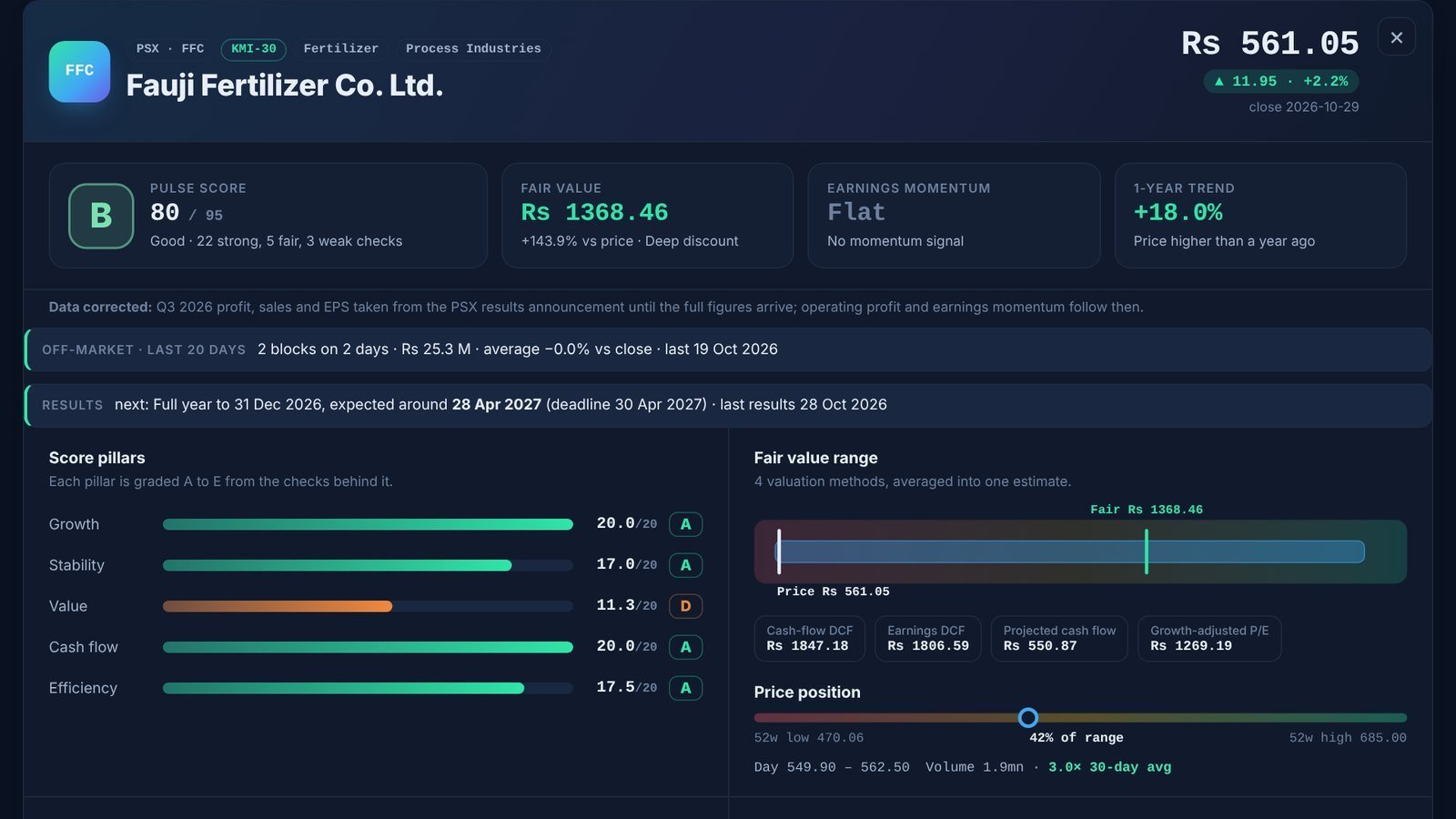
A sensible routine is to read the watch-outs first, check whether the latest results explain a very low P/E or a very high yield, and use Compare to put your two favourite candidates side by side.
Five screens to try
Each link opens the screener with the filters already set.
- Quality at a fair price: Pulse at least 70, P/E at most 8.
- Established dividend payers: Pulse at least 60, yield at least 8%, market value at least Rs 20 bn.
- Fresh earnings momentum: a full signal and results in the last 14 days.
- Below book value, decent quality: P/B at most 1, Pulse at least 60, Rs 10 bn or more.
- Shariah and undervalued: KMI-30 members with a margin of safety of at least 25%.
Good habits and limits
- Know when the data updates. Prices update through the trading day, and scores update once a day. New results usually reach the screener within a day of the announcement. Fundamentals for a new quarter can take a few days to fill in.
- Extreme numbers deserve a second look. A very low P/E can come from a one-off gain, and a very high yield can follow a special dividend or a falling share price.
- Use market value as a liquidity check. Small companies can be hard to buy and sell in size.
- Re-run your saved screens after results. Scores, P/E and momentum all change when new results arrive, so a stock can join or leave your list overnight.
The screener is a research tool. Scores, fair values and signals are our calculations from reported figures and can be wrong or out of date. Nothing here is investment advice; do your own research before you invest.
Bilal, Market Pulse Hub